 Granular
Roadmap board
A kanban roadmap you share with your AI agents: six columns, cards with a priority, and one click to hand a card to an agent, which moves it as it works.
Updated 2026-10-20
The roadmap is one living board that you and your agents share. It opens in Brain, on the Roadmap view. It has six columns: Idea bank, Backlog, In progress, Testing, Done and Parked. Each card carries a priority and an area. Agents move their own cards as they work, and you can drag cards, open them and hand them to an agent.
Open the board
- Click the Brain icon at the right of the title bar.
- Click Roadmap at the top of Brain.
Or press ⌘K (Ctrl+K on Windows) and choose Open roadmap. When a session is working a card, the card's name shows at the top of its chat; its arrow opens that card here.
To see the board bigger, click Brain's full screen button.
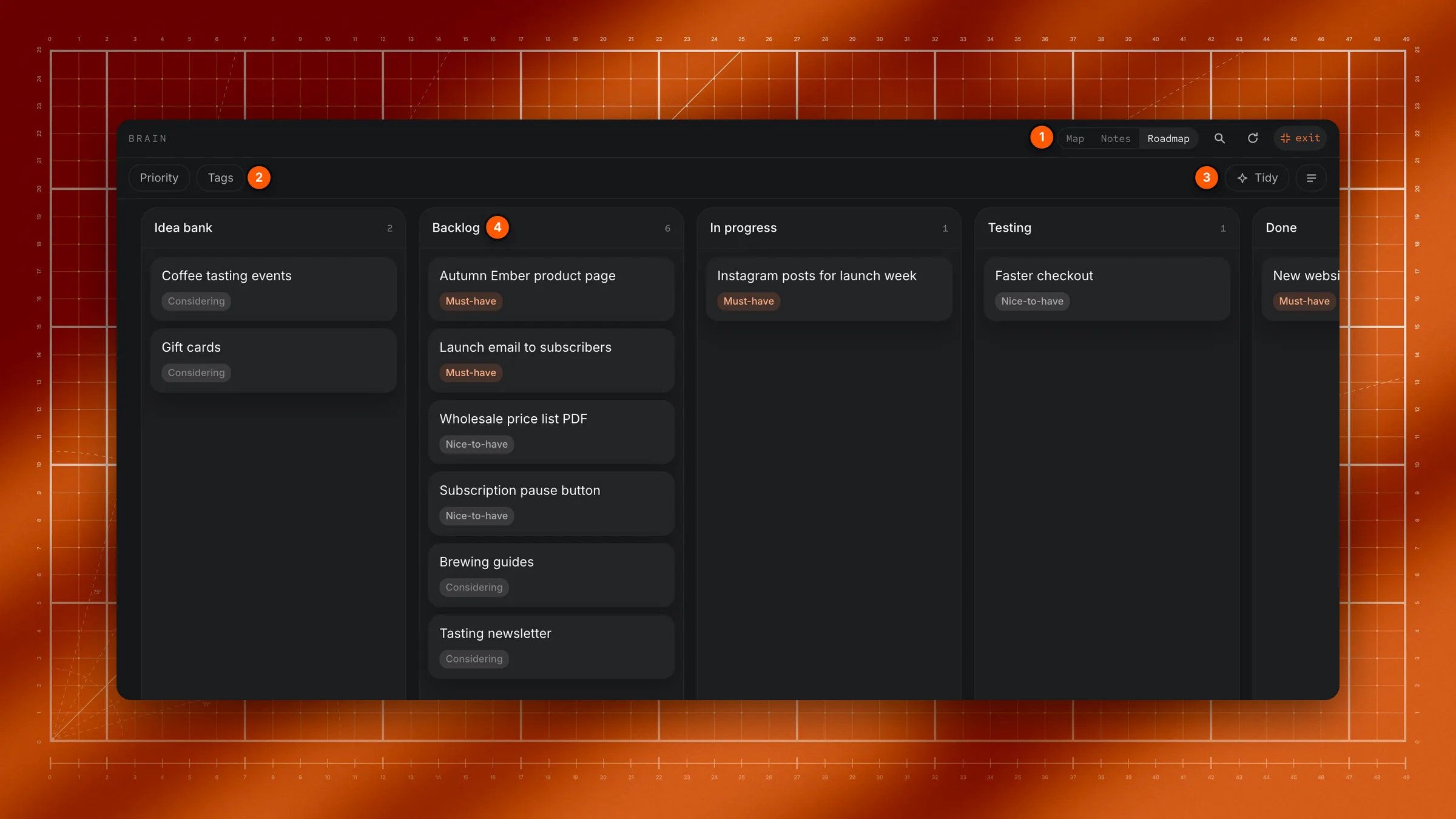
What the roadmap board is
The roadmap is a single, living board that you and the agent both read and change. It holds your project's whole pipeline: ideas you are still weighing, work queued up, what is being built right now, what is waiting for you to check, and what has shipped. Because you share the same board, you never have to brief an agent on "what's next". It can see the board, pick up a card and update it, and you can watch that happen.
The board is part of your project's digital brain, the folder of linked notes that gives agents standing context.
The six columns
Cards flow left to right. Each column means something specific:
- Idea bank. Ideas you have not decided to build yet. A thought lands here so it is never lost, without pretending it is on the plan.
- Backlog. Work you have committed to, waiting to be picked up. Idea bank is "maybe someday", Backlog is "yes, just not started".
- In progress. Being worked on right now. When an agent starts a card, this is where it goes.
- Testing. Built and ready, waiting for you to check it. The agent tells you what to click or try.
- Done. Shipped and checked.
- Parked. Set aside on purpose, with the reason written down. This column only shows when something is parked.
How a card is structured
Every card is a title plus two tags, a priority and an area. The column it sits in is its stage. In the file, a card line looks like this:
Voice mode, talk to agents · priority: must · area: agent- Stage is the column: where the card sits in the pipeline.
- Priority is how strongly you want it: Must-have, Nice-to-have, Considering or Unlikely.
- Area is the kind of work, like design, platform, agent or marketing.
A card can also have a short summary. When a card needs a real plan, the plan goes in its own linked note, and the card points to it.
Use the board
- Change a card's stage: drag it to another column.
- Find cards: click Brain's magnifier and type in Search cards…. Or filter with Priority and Tags in the toolbar.
- See more on each card: click the summaries button at the right of the toolbar to show each card's summary and area.
- Refresh: click Brain's refresh button to read the roadmap again.
- Tidy: click Tidy. An agent checks the board against what's really been done and proposes stale cards to move.
Open a card
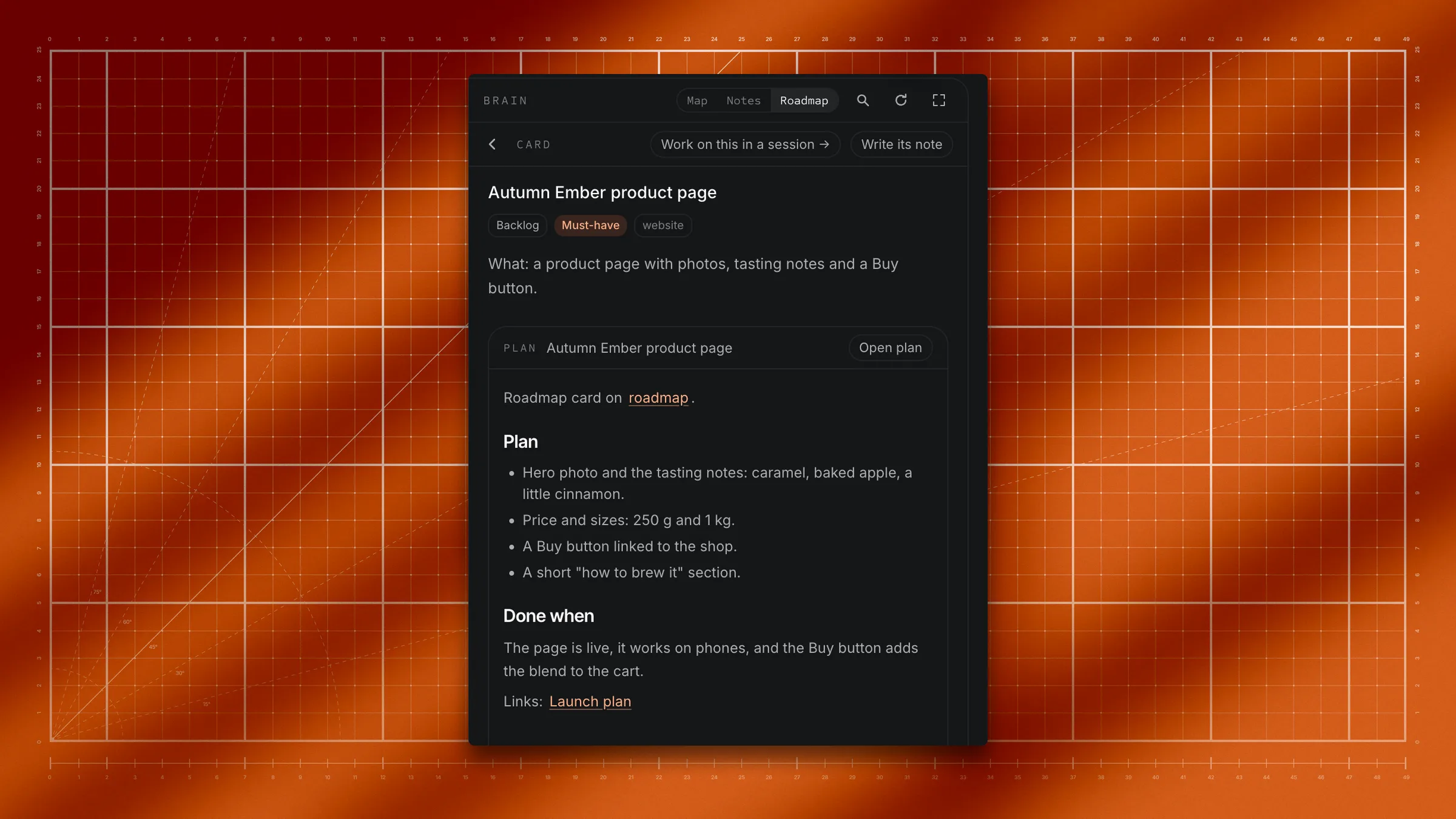
Click any card. Its card view opens in place, with:
- the title, its stage, priority and area,
- who's working on it right now ("Being worked on by …"),
- its summary, with clickable
[[links]], - a preview of its plan note, if it has one. Click Open plan to read or edit it in Files; Back brings you to the card again.
At the top of the card view:
- Work on this in a session →: hand the card to a new session, or to one that's already running.
- Write its note: an agent reads the project's history and brain for this card, then writes its plan note.
- Promote to a note: move the card's details into its own note in the brain. Shown only while the card has no plan note.
- The round back arrow (Back to Roadmap) returns to the columns.
You can also hand a card to a session from the columns: hover the card and click its chat icon.
How work flows
Agents move their own cards. When an agent starts a piece of work, it moves its card to In progress. When it finishes building, it moves the card to Testing and tells you how to check it. Once you are happy, you move the card to Done (or tell the agent to).
A typical card's life:
- An idea gets captured in the Idea bank.
- Once you commit to it, it moves to the Backlog.
- An agent picks it up and moves it to In progress.
- When the work is built, the agent moves it to Testing and tells you what to check.
- You check it and move it to Done.
More than one session can work on the same card. When that happens, the agents can see each other so they don't duplicate work.
Where the board lives
The board is stored in a single Markdown file, roadmap.md, in your project's brain folder. Headings are columns and bullet points are cards, so the file and the board are always the same thing. If an older project keeps a roadmap.md at the top level of the project instead, the board reads that.
If a project has no roadmap yet, the Roadmap view says No roadmap yet with a Create roadmap button.
Questions
How do I give a roadmap card to an AI agent?
Where did the full-screen board go?
Do I move cards myself, or does the agent?
What is the difference between the Idea bank and the Backlog?
What does Testing mean?
Where does the board live?
roadmap.md, inside your project's brain folder.