 Granular
Your first session
How to get started with Granular: set it up, pick a project folder, connect an AI model and give the agent its first task, then watch it work.
Updated 2026-10-20
The first time you open Granular it walks you through a few setup screens: sign in (optional), connect an AI model, and pick a folder to work in. Then it opens a session, where you ask for what you want and watch the agent do it in a real terminal, with anything it builds showing in the preview.
A session is one conversation with an agent, with its own chat and terminal. A project is the folder on your computer the session works in. A terminal is the text window where programs run; you can watch it without ever typing in it.
Before you start
- Granular installed. See Install Granular on macOS or Install Granular on Windows (beta).
- An AI model to use. One of: a Claude account, a ChatGPT account for Codex, an API key (a password-like code from an AI company) for Claude, OpenAI or Gemini, or Granular's free starter credits. See Connect an AI model.
- Any plan. Everything here works on the Free plan.
Step 1: Set up Granular
The setup screens show once, the first time you open the app. You can't skip the whole setup, but most screens have a way past them.
Sign in or create an account. Type your email and click Continue →. Granular emails you a 6-digit code (it works for 10 minutes); type it in. Or click Continue without an account: Granular works fully on your computer without one. You need an account later for free AI credits and sharing links.
Welcome. A short demo plays. Click Get started →.
About you. Pick what best describes you (and, if you signed in, your name). Click Continue →.
Connect your agent. This is the one step you have to finish. Granular first checks your computer for agents you already have; anything ready shows as a green Ready card. Otherwise pick one of the three cards:
- Free credits ("Start free, no account needed beyond Granular"): click Start free for a one-time bundle of hosted AI credits. No card. It needs a free Granular account.
- Claude ("Use your Claude Pro or Max plan"): click Sign in and finish in the browser window that opens.
- ChatGPT (Codex) ("Works on the free ChatGPT plan"): click Sign in. If Codex isn't on your computer yet, the card says it needs a free one-time setup and shows Set up instead; Granular does it for you.
For anything else, click More ways to connect…. It opens more cards right there: Gemini, OpenRouter, GitHub Copilot, Cursor, Grok, Pi, OpenCode, Local models and API key / custom provider. A card turns green when it's connected. If a card needs a second step, such as an install, finishing a sign-in, a code or pasting a key, it opens in a small window with a terminal so you can watch.
When one is ready, Continue → lights up. Click it. You can add more AI accounts later. See Connect an AI model.
How do you want to start? Choose where to work:
- Personal OS (recommended): a new folder with a starter brain (notes the agent reads for context), a roadmap board and some skills. Type a Project name, optionally click Change location…, then click Create Personal OS & continue →.
- Use a project: pick a folder you already have from the list, or click Browse for another folder…. If the folder has no brain yet, Granular offers Install Project Brain → or Not now.
Connect your tools. Optionally connect apps you already use, such as Gmail, Slack, Notion or GitHub, so the agent can act in them for you. You can do this later in Settings, under Connectors. See Connect an app. Click Continue → or Skip for now →.
Your private Key Vault. Where secret keys for your projects are kept, encrypted on your computer. Click Continue → or Skip for now →. See Vault for API keys and secrets.
Start free, upgrade anytime. Pick Free and click Continue with Free →, or pick a Pro option and click Start Pro →. See Plans and pricing.
You're all set. Click Open Session →.
Step 2: Look around your first session
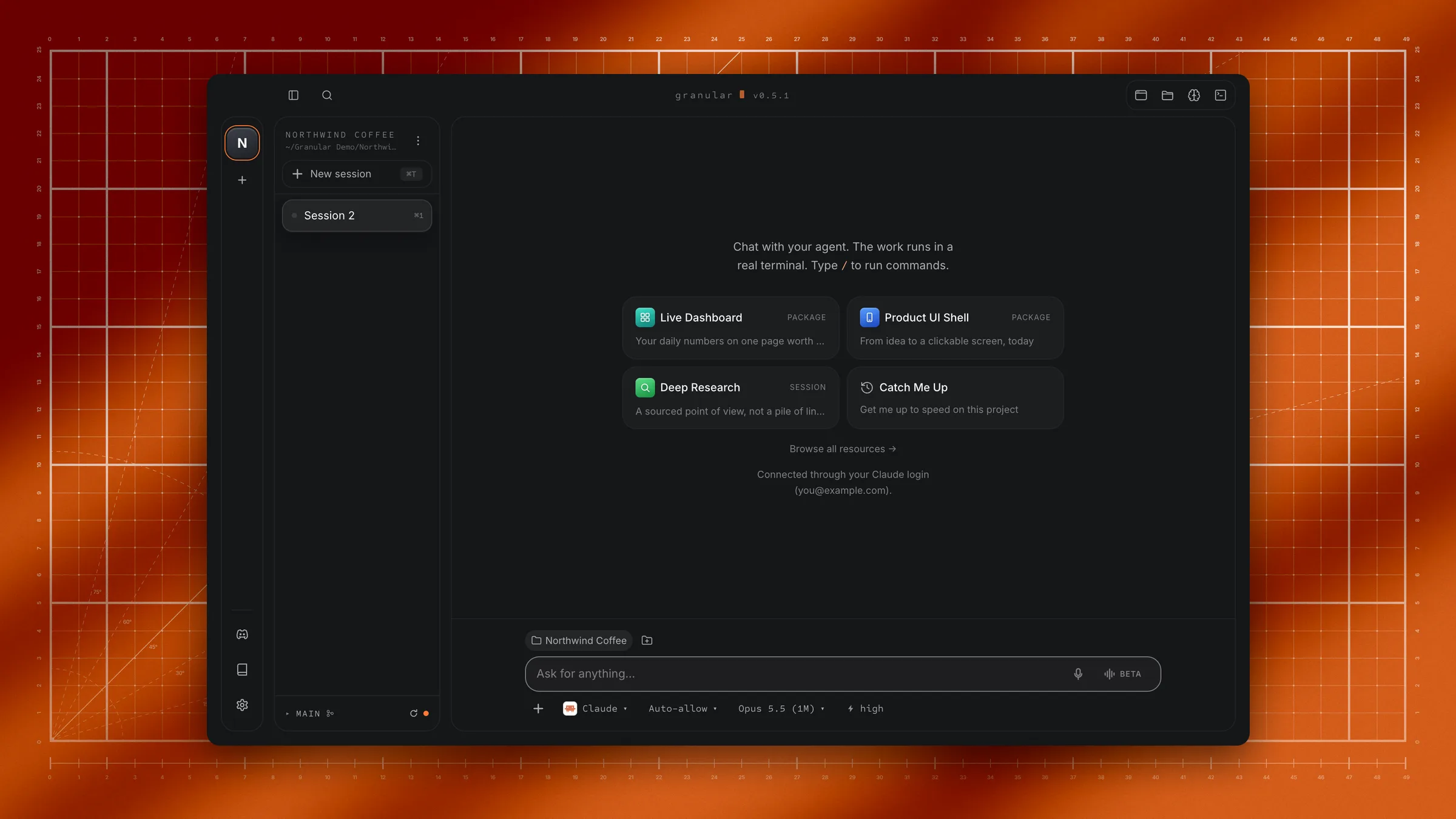
Granular opens a session in the project you chose. On a brand-new install the agent usually starts with a short guided tour called Show Me Around. You can watch it, answer its questions, or click stop under the chat box to end it and do something else.
You'll see:
- The sidebar on the left: your project and its sessions, with New session at the top.
- The chat in the middle, with the box at the bottom that says "Ask for anything…".
- Four tool icons at the right of the title bar: Preview (pages and pictures the agent makes), Files (every file in your project), Brain (your notes and roadmap) and Terminal (the commands the agent runs). Click one to open it beside the chat; click it again to close it. ⌘J (Ctrl+J on Windows) opens and closes the Terminal.
In a new session with nothing in it yet, the chat shows starter cards, such as Catch Me Up (the agent reads the project and tells you what's in it) or Connect Your Tools. Click one to start with it.
For a full tour of every part of the window, see The Granular window.
Step 3: Ask for something
- Click the chat box.
- Type what you want, the way you'd ask a capable colleague. Say what the result is for and anything you care about.
- Press Enter.
To add a second line without sending, press Shift+Enter. To give the agent a picture or file to work from, drag it into the chat, or click + under the chat box and choose Attach files. See Add files to a chat.
Some first requests to try:
Make a one-page website for my coffee brand. Dark theme, a short story about us, and a sign-up form for our newsletter. Show it to me when it's done.Read the notes in this folder and turn them into a one-page plan with goals, next steps and open questions.Make a simple budget table for a three-day trip to Lisbon for two people, as a web page I can look at.What you'll see
- The agent replies in the chat, saying what it's about to do.
- Commands run in the terminal. Each command and its result appear as it runs. Open the Terminal icon in the title bar to watch; its icon glows while a command is running. You don't need to understand them.
- Files appear in your project folder. Everything the agent makes is a normal file on your computer. Open Files to see and read them.
- The preview opens by itself when the agent has something to show, like a web page.
- While it works, the chat box says "Working… Enter queues your next prompt". Anything you send then waits and runs next.
When it's done, look at the result and say what to change: "Make the headline bigger and the buttons orange." The agent revises it.
If the agent asks before acting
By default the agent can change files in your project folder without asking (Auto-allow). To be asked first, click the permission mode in the chat box's toolbar and choose Ask first. Then, before it runs a command or changes a file, a card appears in the chat, headed for example Permission · change file, with:
- Allow: do it this once.
- Always allow: allow this kind of file change in this folder from now on (not shown for commands, which always ask again).
- Decline: don't do it.
Plan (read-only) lets the agent look and plan but change nothing.
If a command asks a question
Sometimes a command stops and asks something, like "Ok to proceed? (y)". A box appears above the chat reading The command is waiting for your answer. Type the answer and click Send, or click Cancel. For safe questions you can click Let the agent answer this.
Change or undo it
- Stop the agent: click stop under the chat box, or press Esc in the chat box. If it doesn't stop, a Force stop button appears.
- Change what it made: tell it in the chat. "Undo the last change" or "Put the old headline back" works for most things.
- Start fresh: click New session in the sidebar (⌘T, or Ctrl+T on Windows). Your files stay where they are.
- Save loose changes: in a project that uses git (a tool that keeps versions of your files), the Tidy & Commit starter card asks the agent to save everything that changed as tidy versions.
Limits
- One long request can pause. Each request has a step limit. If the agent reaches it, the chat says so and shows Continue. Click it to carry on. Smaller requests avoid this.
- The Free plan allows 2 projects and 4 sessions in each project. Pro removes those limits. See Plans and pricing.
- Your AI account's own limits apply. The agent uses the account or key you connected.
Troubleshooting
If Continue → stays greyed out on the Connect your agent screen
No AI model is ready yet. Finish signing in in the browser window, add a key under More ways to connect…, or click Start free. Then return to Granular.
If the ChatGPT (Codex) card shows Set up instead of Sign in
The Codex program isn't on your computer yet. Click Set up: Granular installs it in a small window with a terminal, then goes straight on to the sign-in.
If the Free credits card says they're used up
This account or computer already had its free credits. Pick another card, or see AI Add-on credits.
If creating the project folder fails
Granular shows the reason. Click Choose a different folder and pick another place, for example inside your Documents folder.
If nothing happens after you press Enter
Check the chat box. If it says "Working…", the agent is busy and your message is queued. If it's empty and nothing changes, check the account and model in the chat box's toolbar: that account may need signing in again. See Connect an AI model.
If the preview says "Nothing answered at ..."
The page's address isn't answering. Click Ask the agent to fix it, or click Reload once it's running.
If the chat says the run reached the step limit
Click Continue. Your progress is kept.