 Granular
The Granular window
A map of the Granular window: the chat, your projects and sessions, the Preview, Files, Brain and Terminal tools, settings, quick actions and shortcuts.
Updated 2026-10-20
The Granular window has a title bar along the top with four tool icons on its right, a sidebar on the left for your projects and sessions, the chat in the middle, and a tools pane on the right that shows whichever tool you open: Preview, Files, Brain or Terminal. Settings, the library and the command palette open on top when you need them.
A project is a folder on your computer you work in. A session is one conversation with an agent inside that project. The app also calls a session a chat.
Map of the window
| Area | What it's for | How to open or hide it |
|---|---|---|
| Title bar | Hide the sidebar, open quick actions, check for updates, upgrade, open a tool | Always visible |
| Projects column | Switch project, add a project, open the Library or Settings | Part of the sidebar |
| Session list | See, start, rename and close sessions in the current project | Part of the sidebar |
| Chat | Talk to the agent in plain English | Always shown in a session |
| Preview | See a web page, local site, image, video or PDF | Preview icon in the title bar |
| Files | Browse your project's files and read any of them | Files icon in the title bar |
| Brain | See your notes as a map or a list, and your roadmap | Brain icon in the title bar |
| Terminal | Watch the commands the agent runs, or run your own | Terminal icon in the title bar, or ⌘J (Ctrl+J on Windows) |
| Library | Add skills, design systems and other resources | Library button at the bottom of the projects column |
| Settings | Account, billing, keys, connectors, privacy | Settings button at the bottom of the projects column, or ⌘, (Ctrl+, on Windows) |
| Quick actions | Search every command by name | Search icon in the title bar, or ⌘K (Ctrl+K on Windows) |
Title bar
The title bar is one row with three parts.
On the left:
- Hide sidebar / Show sidebar: the square icon. When the sidebar is hidden, the project icon and the session's name appear next to it. Hover there to slide the sidebar out, or click to dock it back.
- Quick actions: the magnifying glass. See Quick actions.
In the middle:
- The granular name.
- The version number. Click it to check for updates. When an update is ready, it changes to Update · vnumber; click that to install it.
- Upgrade to Pro, shown only on the Free plan.
On the right: the four tool icons, Preview, Files, Brain and Terminal. Click one to open that tool; click the lit one again to close it. They always act on the chat you're looking at, and each chat remembers which tool it had open. The Terminal icon glows while a command is running.
On Windows, the window's own minimise, maximise and close buttons sit at the top right, after the tool icons. On a Mac they're the usual three dots at the top left.
Sidebar
The sidebar has two columns.
Projects column (narrow, on the far left):
- One square icon per project. Click one to switch to it. A glow means an agent is working in that project. Drag icons to reorder them.
- + (New project…) adds a project by choosing a folder.
- Library and Settings sit at the bottom.
Session list (wider, next to it):
- At the top: the project's name and its folder. New sessions start in that folder.
- ⋮ (Project settings) opens the project's settings.
- New session (⌘T, or Ctrl+T on Windows) starts a new session in this project.
- Below that, your sessions. Click one to open it. Hover a session and click its … button for Rename, Make this the boss, Switch to worktree… and Close session. Drag sessions to reorder them. Worker sessions sit under their boss; see Boss and worker agents.
- Previous, at the bottom, lists closed sessions. You can read them but not continue them. See Sessions and projects.
The chat
The chat fills the middle of the window. Type in the box at the bottom (it says "Ask for anything…"), then press Enter. While the agent works, the box says "Working… Enter queues your next prompt": anything you send then waits its turn. A stop button appears while it works.
Under the box is a toolbar with:
- +: attach files, connectors and saved prompts. Attach files has From files (opens the Files tool so you can add project files to the message) and From computer (your computer's own file picker). See Add files to a chat.
- The microphone (Dictate): speak instead of typing. See Voice dictation and voice mode.
- The account and model: which AI account and model this session uses. See Connect an AI model.
- Effort: how hard the model thinks, from Low to Ultra (the default is High).
- Permission mode: how much the agent checks with you before changing files. Auto-allow (the default) changes files in this folder freely. Ask first checks with you before changing a file. Plan (read-only) makes no changes.
- The session's folder.
You can drag files and images into the chat to give the agent context. Type / at the start of a message to see chat commands.
The tools pane
When you open a tool, it appears on the right of the chat. One tool shows at a time; click another icon to switch.
Every tool has the same top row: its tabs on the left, a + to open another tab, and a full screen button on the right. A tool with only one tab shows its name instead of a tab. See Tool tabs.
- Resize it: drag the thin divider between the chat and the tool.
- Full screen: the full screen button fills the window with the tool, below the title bar. Hover the window's left edge to slide the chat out. Press Esc or click the button again to go back. (In the Terminal, Esc goes to the terminal, so use the button.)
Preview
The preview shows web pages, sites running on your computer, and local files such as HTML pages, images, videos and PDFs. It opens by itself when the agent shows you something it built. Its first tab, Agent preview, is where the agent shows its work. You can open more tabs with +.
Under the tab row is a toolbar with Back and Forward, an address box (type a web address or a file path), a star for local files (starred files also show in Files), Show this file in Finder (File Explorer on Windows), Open in your default browser, Reload preview, zoom (Zoom out, Reset zoom to 100%, Zoom in), a screen-size button that cycles Desktop, iPad and iPhone widths, Share for local HTML and Markdown files (see Published links), Screenshot this preview into chat (Full page, Viewport, Area or Annotate) and Pick an element to ask about. When the pane is narrow, some of these move into a ⋯ menu.
When nothing is showing yet, it says "Nothing to preview yet" with a Show the latest work button.
Files
Files lists every file in your project as a list or a grid, with search, filters and sorting. Click a file to open it: notes, text and code open in their own tab right in Files; web pages, images, videos and PDFs open in Preview. See Files.
Brain
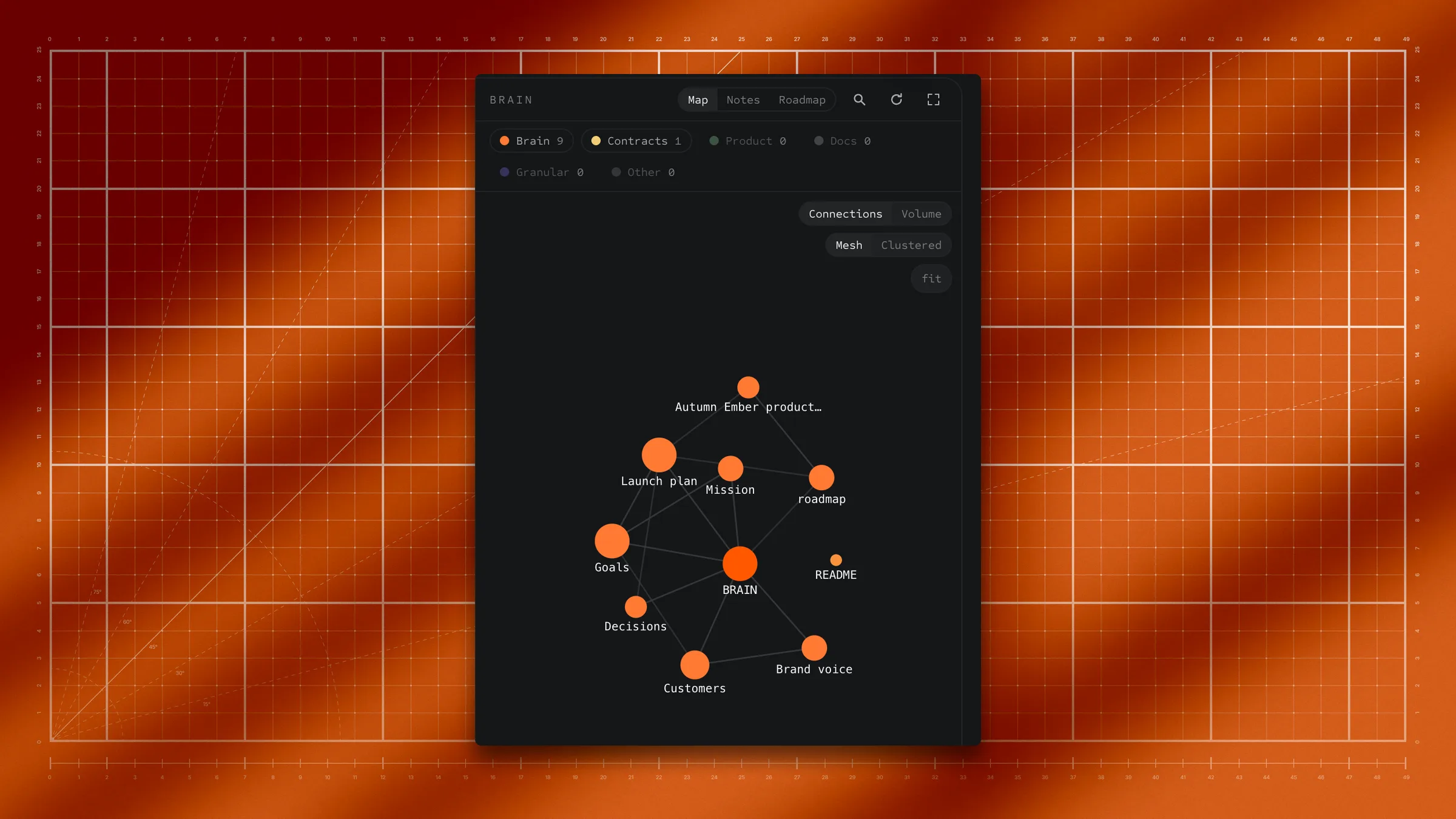
Brain gives you an overview of the notes in your project. It has three views, picked at the top: Map (each note a dot, each link a line), Notes (every note, grouped by folder) and Roadmap (your roadmap board). Click a note to read it; it opens in Files. See Digital brain and Roadmap board.
Terminal
The terminal is a real command window, the text-based way to run programs on your computer. Its first tab, Main terminal, is where the agent runs its commands, with their results appearing as they run. You don't have to type in it, but you can, and you can open more terminals with +. See Terminal.
Library
Click Library at the bottom of the projects column (or Open the library… in quick actions) to browse skills, design systems and other resources you can add to a project. It fills the window; click Library again or click a project to leave it. See Resource library and skills.
Settings
Click Settings at the bottom of the projects column, or press ⌘, (Ctrl+, on Windows). Its sections are General, Privacy & access, Account, Billing & plan, Links, Key Vault, Connectors, Connections and Phone. Click Settings again, press the shortcut again, or click a project to go back.
Light or dark: open Settings → General and choose Light or Dark under Appearance.
Quick actions (the command palette)
Press ⌘K (Ctrl+K on Windows) or click the magnifying glass in the title bar. Type part of what you want and pick it. Some of what's there:
- New session, Close session, Rename session, New project…
- New session on a branch…, New session in folder…
- Toggle terminal, Toggle light/dark theme, Open settings, Project settings, Privacy & access
- Make this session the boss, Demote boss to a normal session
- Open roadmap, Create a roadmap card from this conversation
- Open the library…, Saved prompts, Git prompts
- Publish this page, Take this page off the web
- Check for updates…
Press ⌘K again (Ctrl+K on Windows) or Esc to close it. Some rows open a second list; there, Esc goes back one step first.
Zoom
You can make everything in the window bigger or smaller.
- Zoom in: ⌘+ (Ctrl+plus on Windows).
- Zoom out: ⌘- (Ctrl+minus).
- Back to normal size: ⌘0 (Ctrl+0).
On a Mac you can also use View → Zoom In, Zoom Out and Actual Size in the menu bar. Each press is a small step, from a little over half size to about one and three quarters. Granular remembers your zoom the next time you open it.
Inside the Preview the same keys zoom only the web page, not the app. Click in the Preview first, then press them. See Tool tabs.
Keyboard shortcuts
| Action | Mac | Windows |
|---|---|---|
| Open or close quick actions | ⌘K | Ctrl+K |
| New session | ⌘T | Ctrl+T |
| Open or close the Terminal tool | ⌘J | Ctrl+J |
| Open or close Settings | ⌘, | Ctrl+, |
| Go to session 1 to 9 in this project | ⌘1 to ⌘9 | Ctrl+1 to Ctrl+9 |
| Zoom the app in, out, or back to 100% | ⌘+ / ⌘- / ⌘0 | Ctrl++ / Ctrl+- / Ctrl+0 |
| Zoom the page, with the Preview focused | ⌘+ / ⌘- / ⌘0 | Ctrl++ / Ctrl+- / Ctrl+0 |
| Close the selected Preview or Files tab | ⌘W | Ctrl+W |
| Move between tabs, with a tab focused | ← / → | ← / → |
| Start or stop dictation | ⌘⇧D | Ctrl+Shift+D |
| Send your message | Enter | Enter |
| New line in your message | ⇧Enter | Shift+Enter |
| Stop the agent | Esc (in the chat box) | Esc (in the chat box) |
| Leave full screen, or stop picking an element | Esc | Esc |
| Undo or redo while editing a note | ⌘Z / ⌘⇧Z | Ctrl+Z / Ctrl+Shift+Z |
| Move a project up or down | ⌥↑ / ⌥↓ on a selected project icon | Alt+↑ / Alt+↓ |
Change the layout
- Hide the sidebar: click Hide sidebar at the top left. Click Show sidebar to bring it back.
- Open a tool: click its icon in the title bar. Click it again to close it and give the chat the whole width.
- Resize: drag the divider between the chat and the tool, or use full screen.
- Zoom: ⌘+ and ⌘- (Ctrl on Windows).
- Reorder: drag project icons or sessions.
You can't move the tools pane to the other side of the window or show two tools at the same time.
Limits
- Narrow windows hide things. When the window is narrower than about 900 pixels, the sidebar and the tools pane hide themselves so the chat has room. They come back when you widen the window. With a tool open, the sidebar needs about 1000 pixels. Clicking a tool icon in a narrow window makes the window wider. On a very narrow window, the version number, then the granular name, then Upgrade to Pro also hide from the title bar.
- Mac and Windows have the same layout and shortcuts, with Ctrl in place of ⌘ and the window buttons at the top right on Windows.
Troubleshooting
If the sidebar disappeared
Your window may be too narrow, or the sidebar is hidden. Widen the window, or click Show sidebar at the top left.
If a tool won't open, or closed by itself
The window is too narrow to show it next to the chat. Click the icon again (Granular widens the window), or make the window wider. If an icon isn't lit, its tool isn't on screen.
If you can't find the terminal
It's a tool now. Click the Terminal icon at the right of the title bar, or press ⌘J (Ctrl+J).
If you can't find the light/dark switch
It moved to Settings → General → Appearance. You can also press ⌘K and choose Toggle light/dark theme.
If everything looks too big or too small
You may have zoomed the app. Press ⌘0 (Ctrl+0) to go back to normal size.
If you see "Nothing to preview yet"
The agent hasn't shown anything yet. Click Show the latest work, type a file path or address in the address box, or ask the agent to show you what it made.
If you see "Nothing answered at ..." in the preview
The page's address isn't answering, usually because the app that serves it isn't running. Click Ask the agent to fix it, or start it yourself and click Reload.
If a keyboard shortcut does nothing
Click inside the Granular window first so it has focus. On Windows use Ctrl, not the Windows key. Some shortcuts only work while a particular tool has focus, as the table above says.